The core idea

Somebody else already decided what your farm looks like

In most farm products, someone decided years ago what a paddock is, what you’re allowed to record about a mob, and what goes on a spray record. Those decisions are set in concrete. Changing one means a new version of the software, and your particular need has to be worth building for everybody else as well.

Alffi doesn’t work that way. What you keep records on, what goes on each one, how they join up and what gets worked out from them are all things you set — not things we built in before we’d met you. Adding a new kind of record is about as involved as adding a new paddock.

That one difference is what makes everything else on this page possible. It also means the way your place is organised can exist in Alffi without anyone here ever knowing about it.

What you keep track of

Keep records on the things you actually have

Animals, pumps, chemicals, paddocks, jobs — and whatever else your place runs on. If you need to keep track of something, you can, whether or not we thought of it first.

If you keep track of it, Alffi can

Set up a new kind of record yourself, with the details you care about on it. From then on it behaves like everything else — it lists, it searches, it goes on the map, and it turns up in reports.

The details you actually need

Words, numbers, dates, yes or no, a list to pick from, a photo or a document, a spot on the map, a link to another record. Make the ones that matter compulsory, fill in the usual answer by default, and hide the ones that don’t apply.

Things join up the way they do on the farm

A pump sits on a property, an animal runs in a mob, a slasher goes on a tractor. Because Alffi knows how they connect, it can answer a question that crosses all three without you joining it up by hand.

What this looked like in practice Mullinroo Estate wanted something no livestock product ships: herds, the animals in them, and every weight each one has ever carried — with a “Finishing Herd” showing a live head count and daily gain. It was set up through the dashboard in an afternoon. Nothing was written for it, nothing was upgraded, and nobody had to ask us for permission.
Calculated fields

Describe the sum. Alffi writes the formula.

Say what you want in plain English — “weight gain divided by days on feed” — and Alffi produces the formula, runs it against your real records, and shows you the answer before you save it. If the preview is wrong, nothing has been committed.

Three things make this safe rather than clever:

It understands units

Kilograms divided by days gives kilograms per day, and Alffi knows that. Values are stored in standard units and converted for display, so a formula can’t silently add pounds to kilos.

It can only do sums

A calculation works out a number from your own records, and that is genuinely all it is able to do. There is nothing else it is allowed to reach.

It won’t let you break it later

Delete a field a calculation depends on and Alffi refuses, showing you exactly which formulas rely on it. Broken calculations don’t appear months later in a report.

The map

The map isn’t a separate feature

Anything you keep track of can have a spot on the map, or a boundary drawn around it. Paddocks are the real shape of the ground, not a name and a number of hectares you typed in. Gates, tanks, pumps and hydrants are places you can drive to.

  • Satellite imagery as the base layer Draw boundaries against what’s actually on the ground, not an abstract diagram.
  • Everything is clickable through Tap a paddock on the map and you’re in its record, with its history, observations and jobs.
  • Area is derived, not asserted Hectares come from the boundary you drew, so application rates are calculated against real numbers.
  • Spatial questions get spatial answers What’s near me, which runs fall inside this paddock, where is this mob — answered from geometry.
Map Studio

A fence between two paddocks is one post, not two

Most farm mapping treats every paddock as its own independent shape. Draw two paddocks either side of a fence and you get two separate records for the same physical strainer post. On screen they sit on top of each other and look correct. Then someone corrects one of them, and the boundaries quietly drift apart — two versions of a fence that exists once in the world.

Alffi models your farm as a graph of shared posts. A corner used by two paddocks is one record, referenced twice. Drag it, and both paddocks are reshaped in the same transaction. There is no version to go stale, because there is only one post.
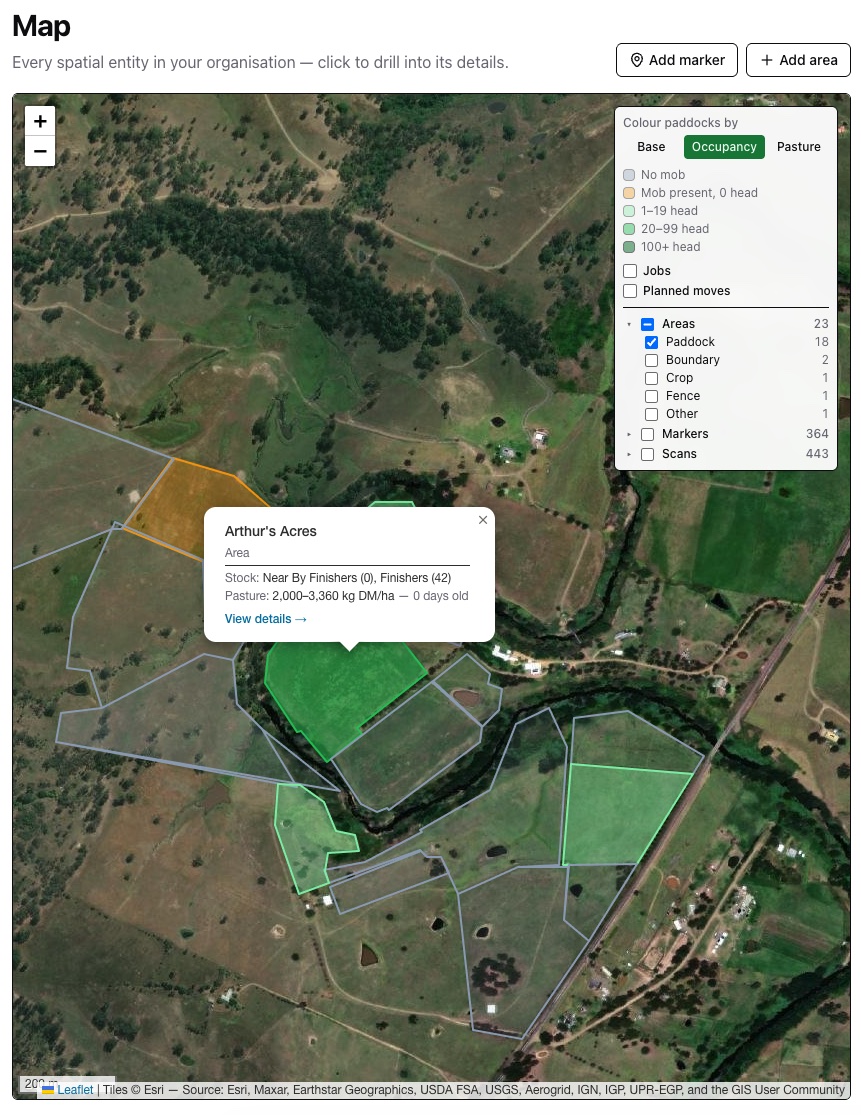
The Alffi map: paddock boundaries drawn over satellite imagery, shaded by how much stock each is carrying, with a panel listing 23 areas, 364 markers and 443 scans. An open card reads Arthur’s Acres — Finishers, 42 head — pasture 2,000 to 3,360 kilograms of dry matter per hectare, nought days old.
Paddocks shaded by what’s in them. Click one and it tells you the mob, the head count and how much feed is standing there.

Snap to what’s already there

When you draw, existing posts show as targets. Click one and you reuse it rather than creating a duplicate a metre away. Before you save, Alffi tells you how many posts it will create and how many it is reusing.

It warns before it reshapes a neighbour

Move a corner that another paddock relies on and Alffi says so first — naming how many points are shared and what else will change — rather than surprising you after the save.

Hectares that stay honest

Area and perimeter update live as you drag, and are always recalculated from the posts themselves. If a stored figure has drifted from its own boundary, the map tells you and offers to fix it.
This wasn’t a theoretical problem On real farm data, Alffi found 163 pairs of markers sitting within two metres of each other — the same posts, recorded twice. Eighty-one markers were already doing double duty as corners of more than one paddock. Two areas, “Lucern patch” and “Crop paddock”, turned out to share all eight of their corners: the same polygon, entered twice, drifting independently. The repair took coincident pairs from 99 down to 1 while preserving all 577 markers across the business and deleting nothing — the single survivor being a genuine half-metre gap, correctly left alone.
Weights, rain and readings

How are they doing compared to last month?

You put a mob through the yards yesterday. The weight on the bar isn’t really the question — the question is whether it beats the last drafting, whether they’re gaining the way they should be, and whether they’ll be ready when you need them.

Most software can’t tell you, because yesterday’s weight wrote over the one before it. Alffi never writes over a reading.

  • Every weigh you have ever done is still there So is every rain gauge dump, condition score and egg count. Weigh a mob again and last month doesn’t disappear — you get the run of numbers, not just today’s.
  • Write it up when you get back to the shed Log a death three weeks later at muster and Alffi records when it happened, not when you finally got to a keyboard.
  • The gauge, the station and the satellite fill themselves in Rainfall, evapotranspiration and paddock soil moisture arrive on their own and sit alongside what you wrote down, in the same history.
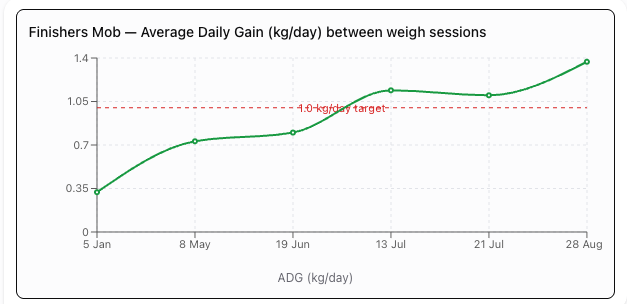
  • Measured against your target, not ours Set the number you’re actually aiming for — a daily gain, a moisture floor — and the trend is drawn against it. The line on the chart is yours, so “are we on track” is answered without arithmetic.
Line chart titled Finishers Mob, average daily gain in kilograms per day between weigh sessions. The trend rises from about 0.35 in January to roughly 1.38 by late August, crossing a dashed line marked 1.0 kg per day target in mid-July.
Six weigh sessions on the Mullinroo finishers, plotted as gain per day between each. The dashed line is the farm’s own target — not a benchmark we set — so the mob crossing it in mid-July is a fact about this operation rather than an industry average.
Readings you take with a camera

Photograph the paddock. Get it read back.

Some of what you want recorded is easier to photograph than to describe. Take the picture where you’re standing and Alffi writes up what it sees — and files it as a dated, located record like any other.

  • It reads the sward, not just the picture Species mix, weed pressure, canopy height, dry matter per hectare, and how the paddock is sitting after a graze.
  • It answers the question you actually had Rest or graze — with a reason. “Two days of grazing have knocked this lane back to 4–7cm. Rest until it gets back up.”
  • It uses what’s in the frame Drop a pocket knife in the shot and it will use it as a scale reference, and tell you that it did.
  • It says how sure it is, and why Every assessment carries a confidence and the reasoning behind it — including what it couldn’t see from that angle.
  • Where and when, without typing it The paddock, the mob nearby and the GPS position come off the photo, so it lands in the right place in the record.
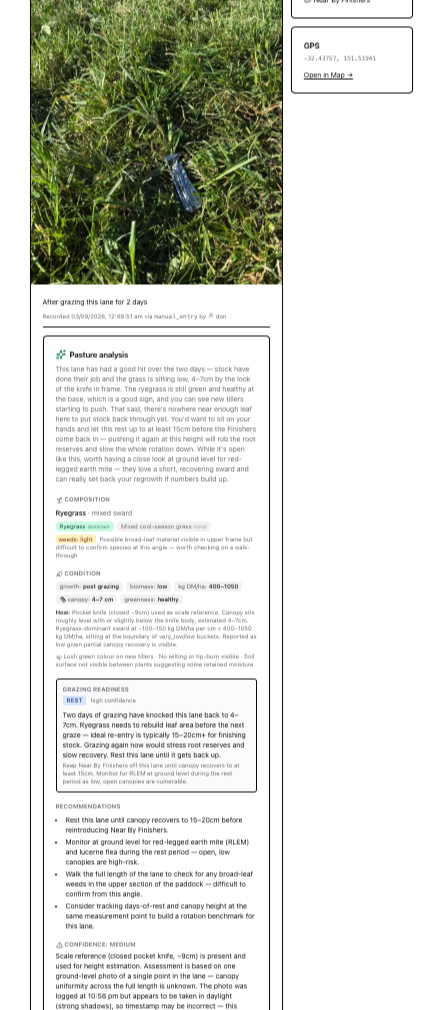
A feed quality record on Arthur's Acres: a photograph of grazed ryegrass with a pocket knife for scale, followed by Alffi's written assessment — composition, canopy height of four to seven centimetres, four hundred to one thousand and fifty kilograms of dry matter per hectare, a grazing readiness of Rest, and four recommendations.
The best line in that report is the one doubting itself Under “confidence: medium”, Alffi notes that the photo was logged at 10:58pm but plainly taken in daylight — so the timestamp may be wrong. Nobody asked it to check that. An assessment that tells you which parts to trust is worth more than one that sounds certain about everything, and it is the difference between a record you can hand an auditor and a paragraph you have to go and verify.

Getting your records in, and out again

The unglamorous part, which is usually where farm software actually fails.

Import what you already have

  • Spreadsheets from anywhere Upload a CSV, map its columns to your fields, and tell Alffi what its odd values mean. It remembers the mapping and applies it automatically next time.
  • Scales and reader files Gallagher weigh sessions import directly, matching animals by electronic tag and creating the ones it hasn’t seen.
  • Documents, read by Alffi Chemical labels, fertiliser brochures, saleyard invoices, kill sheets and nozzle charts — photographed or uploaded, then read into structured records.
  • Review before it lands Imports show you errors grouped by cause, hold uncertain rows for review, and can be reapplied or unwound.

Work with it in bulk

  • A spreadsheet over your records Edit many records at once in a grid, with fill-down and paste straight from Excel.
  • Filters you can send to someone Build a multi-condition filter and share the URL — it opens with the same view.
  • Reports you define Build a report against any of your data, export as PDF, CSV or Excel, with your own logo and colours on it.
  • Nothing is trapped Other software can reach all of it — including the kinds of records you added yourself.
Two ways to use it

Setting it up and running it are different jobs

Setting the place up — adding a new kind of record, deciding what goes on it, turning modules on, bringing old files in — is deliberate work you do occasionally, sitting down. Alffi treats it that way.

The daily work is the opposite: constant, one-handed, in bad light with gloves on. So it’s shaped around what you’re doing rather than what the software calls it. Record a weight. Move a mob. Log the fuel. Nobody out there should have to think about how any of it is set up — and they don’t.

Usually it’s the same person doing both, often on the same day. What changes is the screen in front of them, not what they’re paying for.

Worth knowing

Where it’s still thin

Setting Alffi up around your own operation is the part that is well worn in. These are the rough edges.

Current limits

  • Web only — there’s a phone surface for field work, but no native app and no offline mode
  • Setting up new kinds of records is a desk job, not something you do from the ute
  • There’s no sign-off chain yet — nothing stops a job being marked done out of order
  • The bulk editor is best on moderate selections, not whole-herd operations
  • Data is hosted in Sydney, so the platform is Australia-only for now

What that buys you

  • A shape no other farm product can hold
  • Sums you set up yourself, in your own words
  • One picture of a mixed operation instead of three subscriptions
  • Everything reachable by other software, including the parts you added
  • A vendor who will build your edge case because you are one of four customers

Best seen against your own operation

Bring us a structure your current software can’t model. That’s the interesting demo.

See the modules